- US device IDs in the graph
- 750M+
- Match rate on events
- 90%+
- Meta event match quality
- 7.5+
- Most brands are live
- <20 min
How it flows
How a Funnelish event reaches the Meta Conversions API. Tracked on the funnel page, resolved to a person, then sent.
01 Capture
Captured from Funnelish
Add the Upstack Pixel to your Funnelish funnels to track what shoppers do there. When Funnelish creates the order in Shopify, Upstack records it like any other Shopify order.
See the Funnelish integration →  FunnelishWhat it sends
page / eventsfrom the Upstack Pixel in each funnel’s headfbclid / gclid / ttclidclick IDs kept on the way to checkoutorder_idthe Shopify order Funnelish createsorder sourceshows as Funnelish in Upstack reports
02 Understand
Resolved to one person before it leaves
Every Funnelish event is matched against a 750M+ device graph, so a phone browse and a desktop checkout resolve to one customer rather than two strangers.
How resolution works →  Resolved before it is sent
- IdentityMatched against a 750M+ device graph, so a phone browse and a desktop checkout resolve to one customer.
customer_typeNew or returning, resolved before send.- DeduplicationBrowser and server copies of the same purchase collapse on event ID, so nothing is counted twice.
- Bot and fraud filteringAutomated traffic never reaches the model, because what you keep out of the training set matters as much as what goes in.
03 Activate
Delivered to the Meta Conversions API
Forward deduplicated, identity-resolved conversions to Meta through the Conversions API, and give the model a customer instead of a session.
See the Meta Conversions API integration →  Meta Conversions APIWhat it receives
em, ph (SHA-256)raise Event Match Qualityfbclid / _fbpcredit the click that drove itexternal_idstable person across sessionsevent_iddedupe against the browser pixelvalue / currencyvalue-based bidding
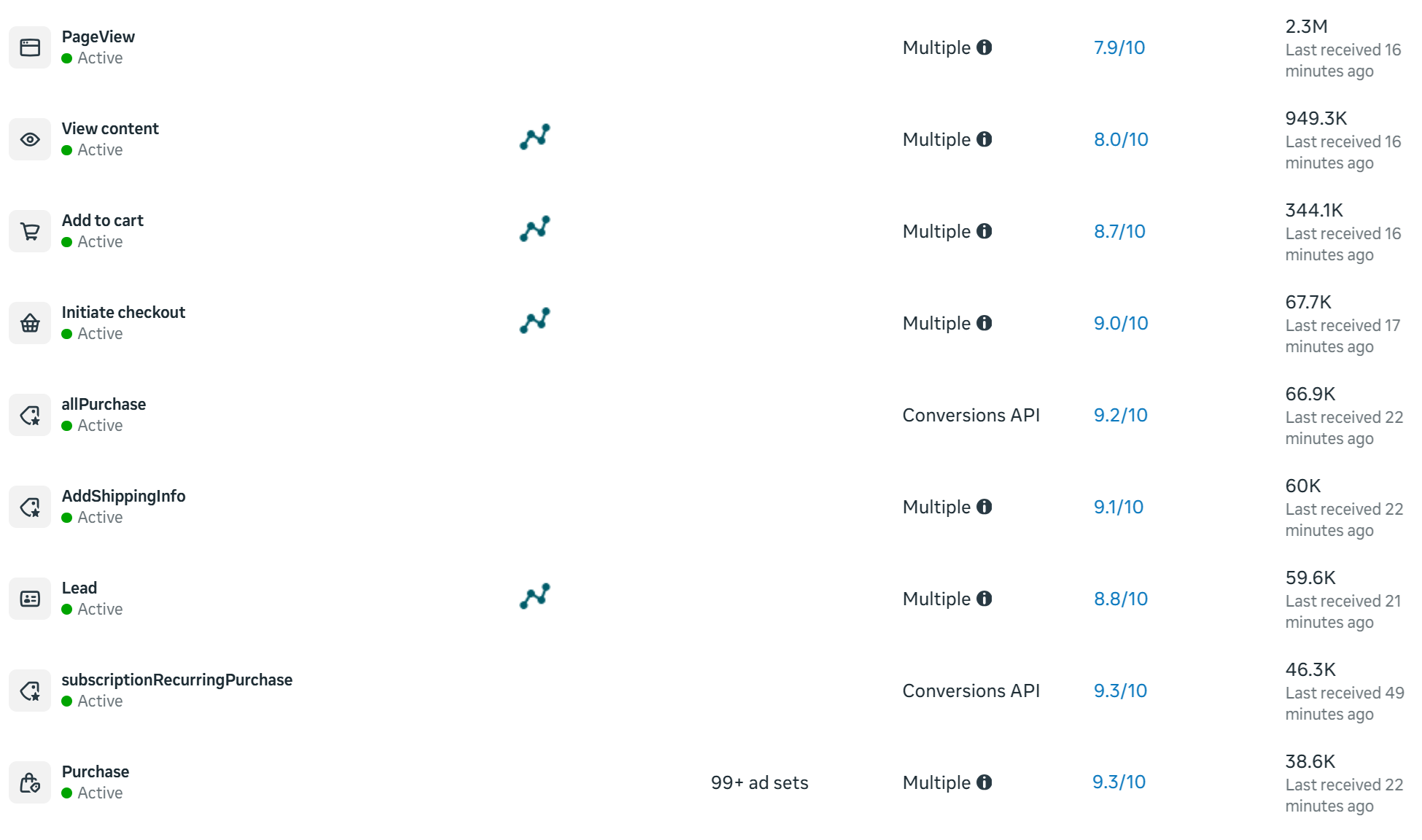
Which events reach the Meta Conversions API
Each Upstack event is mapped to the Meta Conversions API event below before it is sent.
| Upstack event | Sent to Meta Conversions API as | Key data on the event |
|---|
| Page view | PageView | URL, referrer, user agent |
| Product view | ViewContent | content_ids, content_type, value, currency |
| Add to cart | AddToCart | content_ids, value, currency |
| Checkout | InitiateCheckout | value, currency, num_items |
| Purchase | Purchase | value, currency, order_id, content_ids |
Every event carries every available match key: em, ph, fn, ln, ct, st, zp and country, plus fbc, fbp and external_id. Personal data is hashed with SHA-256 before it leaves Upstack.
Funnelish to Meta Conversions API, in detail
How Funnelish funnels reach the Meta Conversions API.
Funnelish hosts funnel pages outside your Shopify theme, so the Upstack app embed doesn’t run on them. You add the Upstack Pixel to each funnel’s head and remove Funnelish’s own Meta pixel, and Upstack sends funnel events to Meta through the pixel and the Conversions API with a shared event_id. The orders Funnelish creates in Shopify reach Upstack like any other Shopify order.
| Funnelish data | Sent to Meta as |
|---|
| Funnel page loads From the base Upstack Pixel snippet in each funnel’s head. | PageView |
| Events you add with Upstack’s event snippets Same pattern as any landing page: one track call per event. | ViewContent, AddToCart and more |
| Orders Funnelish creates in Shopify Received like any Shopify order; they show as Funnelish in order source reports. | Purchase |
| Meta ad click (fbclid) Carried to checkout by the parameter-preserving script. | fbc |
Head, not body
Funnelish lazy-loads codes appended to the page body, so a pixel placed there can load too late to record visitors who leave quickly. Use Append To Page Head.
Funnelish’s own Meta pixel
With Meta connected in Upstack, remove the Meta pixel from your Funnelish funnel settings. Otherwise Meta receives the same events from both.
Click IDs on the way to checkout
If the funnel links to your Shopify store or checkout, add the landing-page guide’s script that appends the query string to outbound links, so fbclid, gclid, ttclid and UTM parameters reach checkout.
Deduplication with event_id
With the default Browser + Server tracking method, Upstack loads the Meta Pixel and sends the same events from its servers, and both copies carry the same event ID, so Meta keeps one. Another sender on the same pixel, such as a platform’s own Meta integration, Meta’s Conversions API Gateway or a third-party CAPI app, has no matching ID, so turn it off.
The catch
Funnel pages sit outside your Shopify theme, so the Upstack app embed doesn't run on them, and click IDs such as fbclid, gclid and ttclid are easily dropped on the way to checkout.
Add the Upstack Pixel to each funnel and keep the click IDs on the links to checkout. The order itself reaches Upstack when Funnelish creates it in Shopify, counted once per Shopify order ID.
Where to check in the Meta Conversions APIDelivery you can audit
Events Manager › your dataset › Event Match Quality
Server events appear with a Server badge, and Event Match Quality is scored per event type.
What changes
What changes when Funnelish feeds the Meta Conversions API. Two gains on the Meta Conversions API side, two on the Funnelish side.
Meta Conversions API
Higher Event Match Quality
More hashed identifiers on every event (email, phone, external ID, click ID), so EMQ rises and Meta matches more of what you send.
Meta Conversions API
Pixel and CAPI, one install
One source of truth for both, with browser and server events deduplicated on event_id so purchases are never double-counted.
Funnelish
Funnel pages tracked
The pixel loads in the head of every funnel page, so visits and the events you configure are recorded on pages your theme never touches.
Funnelish
One setup, every destination
Connect Funnelish once and forward to every ad platform and email tool you run.
-
01
Copy the Upstack Pixel snippet
Take the base pixel snippet with your Pixel ID from the docs’ guide to landing pages and third-party sites.
-
02
Add it to each funnel
In Funnelish, open the funnel’s Settings, Custom Codes, Tracking Codes, click Create a new code, name it Upstack, paste the snippet, choose Append To Page Head and save. Repeat for every funnel.
-
03
Remove Funnelish’s Meta pixel
Delete the Meta (Facebook) pixel from the funnel settings, so Meta isn’t sent every event twice.
-
04
Keep click IDs on the way to checkout
If the funnel links to your Shopify store or checkout, add the script that carries the query string onto outbound links.
-
05
Add the Meta destination
Under Destinations, add Facebook Advertising with your Pixel ID (a 15 or 16 digit number) and a Conversions API token generated in Events Manager, which starts with EAA. Keep the default Browser + Server tracking method.
-
06
Verify on the live funnel
Open the live funnel URL with the Upstack Pixel Helper and confirm events fire, with the click ID in the event details when the URL has an fbclid. Then check Upstack’s Events Manager.
After setup
What to check in Upstack and Meta.
The Upstack Pixel Helper shows events firing on the live funnel URL.
Upstack’s Events Manager shows the funnel’s events against your Pixel ID.
Meta Events Manager lists the events with a Server badge as well as Browser.
Funnelish orders appear in Upstack reports filtered by order source as Funnelish.
Troubleshooting
Common problems and fixes.
-
Quick bounces aren’t recorded
The snippet was added with Append To Page Body, which Funnelish lazy-loads. Move it to Append To Page Head.
-
Duplicate events in Meta
Funnelish’s own Meta pixel is still in the funnel settings. Remove it.
-
Purchases aren’t credited to ads
Click IDs are dropped between the funnel and checkout. Add the parameter-preserving script to the funnel.
-
Event Match Quality shows 0.0 out of 10
Normal for the first 24 to 48 hours and until real orders arrive. If it persists, check the Pixel ID matches and that the access token has ads_read plus ads_management or business_management.
FAQ
Questions about Funnelish and the Meta Conversions API.
How do I connect Funnelish to the Meta Conversions API?
Add the Upstack Pixel to each funnel under Settings, Custom Codes, Tracking Codes with Append To Page Head, remove Funnelish’s own Meta pixel, then add the Facebook Advertising destination in Upstack with your Pixel ID and a Conversions API token.
What is Event Match Quality (EMQ) and why does it matter?
EMQ is Meta’s score, from 0 to 10, for how reliably it can match a conversion event back to a Meta user. Higher EMQ gives Meta’s algorithm more signal to optimize against, and server-side delivery through CAPI typically raises it because events carry more match keys and are not blocked by browser restrictions.
Will purchases be counted twice with the Pixel and the Conversions API both running?
No. Upstack sends a shared event_id on every server-side event, and Meta deduplicates against the matching browser Pixel event. As long as the Pixel ID in Upstack matches the Pixel ID firing in your storefront, deduplication is automatic.
Which events does the Meta Conversions API receive?
PageView, ViewContent, AddToCart, InitiateCheckout and Purchase, each mapped to the Meta Conversions API event of the same name.
Which customer parameters are sent to the Meta Conversions API?
Every event carries every available match key: em, ph, fn, ln, ct, st, zp and country, plus fbc, fbp and external_id. Personal data is hashed with SHA-256 before it leaves Upstack.
How do I check that Funnelish events are reaching the Meta Conversions API?
Upstack marks the destination Healthy, and Events Manager lists the server events with a Server badge. Open your dataset’s Event Match Quality: it is scored per event type, and Meta takes 24 to 48 hours to score new events.
How long does it take to connect Funnelish to the Meta Conversions API?
Most brands are live in under 20 minutes. Once Funnelish events reach Upstack, every destination receives the same resolved events, the Meta Conversions API included.
Where do I add the Upstack Pixel in Funnelish?
In each funnel’s Settings, Custom Codes, Tracking Codes, as a new code named Upstack with Append To Page Head. Not the body: Funnelish lazy-loads body codes.
Do I remove Funnelish’s own Meta pixel?
Yes, if Meta is connected in Upstack. Otherwise Meta receives the same events from both Funnelish and Upstack.
How do Funnelish orders show up in Upstack?
Funnelish creates the funnel’s orders in Shopify, and Upstack receives them like any other Shopify order. Reports that filter by order source list them as Funnelish.
Keep reading
More on Funnelish and the Meta Conversions API.
 Google Ads Conversions
 TikTok Events API
 Pinterest
 Snapchat
 Reddit
 Microsoft Ads
 Checkout Champ
 Shopify
 BigCommerce
 Lasso Commerce
 Phoenix Technologies
 Skio